Usage, HTTP API and WebSocket protocol¶
For pool owners running a release build who want to control or monitor the system over HTTP. The machine-readable companion is swagger.yaml; CLI flags live in the Configuration reference; building from source lives in INSTALL.md.
This document covers how to run the application, the built-in web UI, the complete HTTP REST API, and the WebSocket protocol the UI uses for live updates. Routes are documented as the code registers them today — the same source of truth swagger.yaml is generated against.
Contents¶
- Quickstart: first run
- The web UI
- Security model
- HTTP API conventions
- Route reference by tag
- Key request and response examples
- WebSocket protocol
- Prometheus metrics
- Viewing the API spec
Quickstart: first run¶
The application talks to the AquaLink panel over RS-485 — either a local serial port or a remote serial bridge — and serves a web UI plus REST/WebSocket API. Pick the connection that matches your hardware.
Connect to a local serial port. Use this when the RS-485 adapter is plugged into the machine running the app.
# Linux: an FTDI/CH340-style USB RS-485 adapter shows up as /dev/ttyUSB0
aqualink-automate --serial-port /dev/ttyUSB0
Connect to a remote serial bridge. Use this when the panel is wired to a networked RS-485-over-TCP device (for example a Brainboxes or other RFC 2217 gateway). Pass --rfc2217 when the bridge speaks the RFC 2217 control protocol.
Open the web UI. The web server binds to 127.0.0.1 by default — reachable only from the same machine. To reach it from your LAN, bind a routable address and choose a port:
aqualink-automate --serial-port /dev/ttyUSB0 --address 0.0.0.0 --http-port 8080
# Then browse to http://<host-ip>:8080/
Security: The bind address defaults to 127.0.0.1 and authentication is off by default. Binding to 0.0.0.0 exposes an unauthenticated control surface to your whole network. Turn on a bearer token (see Security model) before exposing the server, and prefer HTTPS. See the Configuration reference for --address, --http-port, and TLS options.
CLI flags and the optional config file share names: a config-file key is the option's long name without the leading dashes (for example the flag --http-port is the key http-port).
The web UI¶
The UI is a static single-page application built on Alpine.js. The server ships it from the document root (override with --doc-root), and your browser drives everything from there — there is no server-side rendering.
On load the page:
- Loads the vendored
alpine.min.jsand Chart.js (vendored aschart.umd.min.js) — no external CDN. - Calls
auth.check(), which issuesGET /api/auth/check. A200means you are allowed in (either auth is disabled or your stored token is valid); a401shows the login screen. - Runs
fetchInitial(a batch of REST reads) to paint the current state, then opens the live WebSocket connections. - Falls back to polling REST every 30 seconds whenever the WebSocket is down, so the UI keeps updating even if the live channel drops.
The WebSocket client opens /ws/equipment and /ws/equipment/stats, matching the page protocol (ws:// for HTTP, wss:// for HTTPS). It reconnects with exponential backoff from 1 s up to 30 s. When a token is stored it is attached as the ['aqualink', 'bearer.<token>'] WebSocket subprotocols.
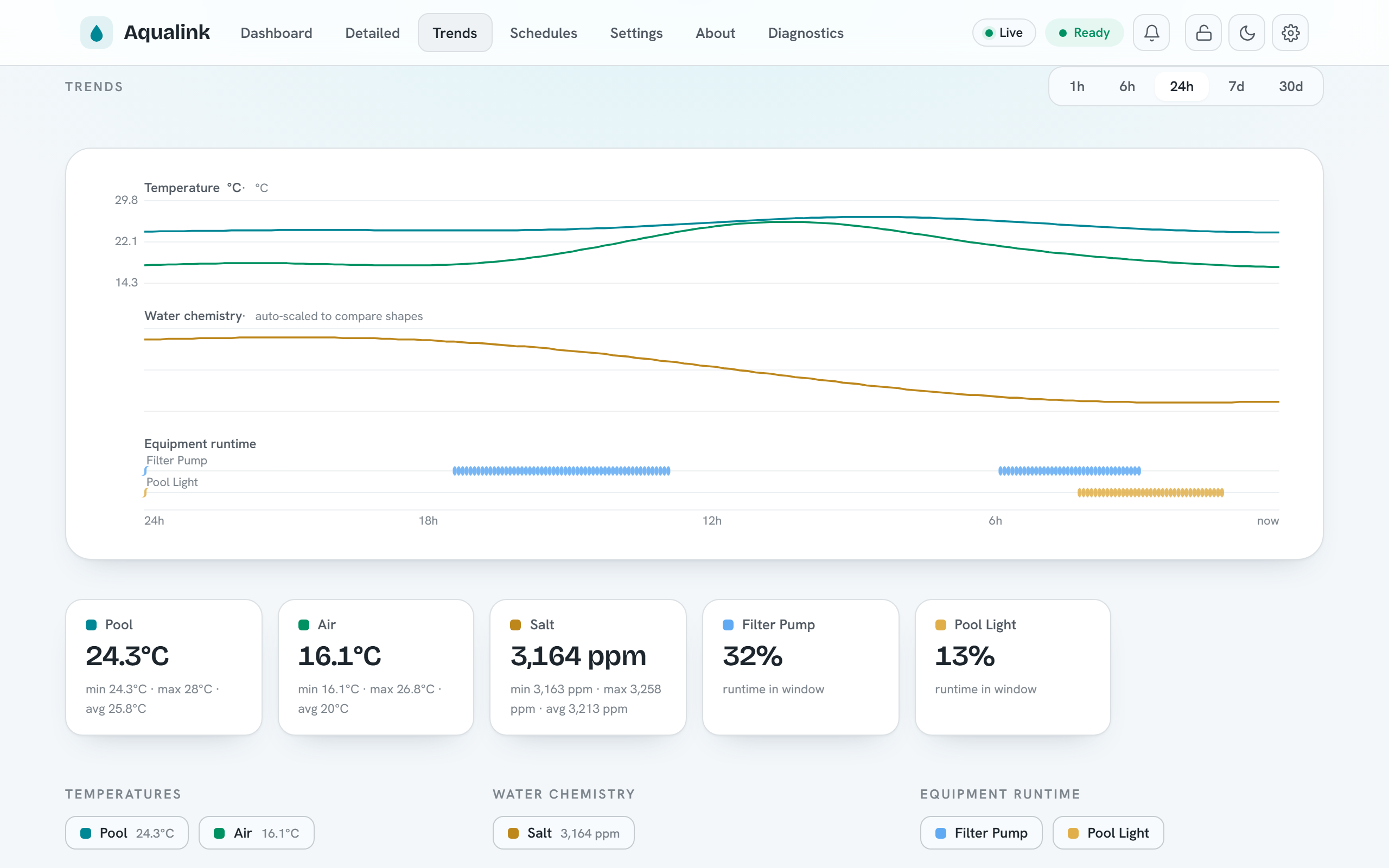
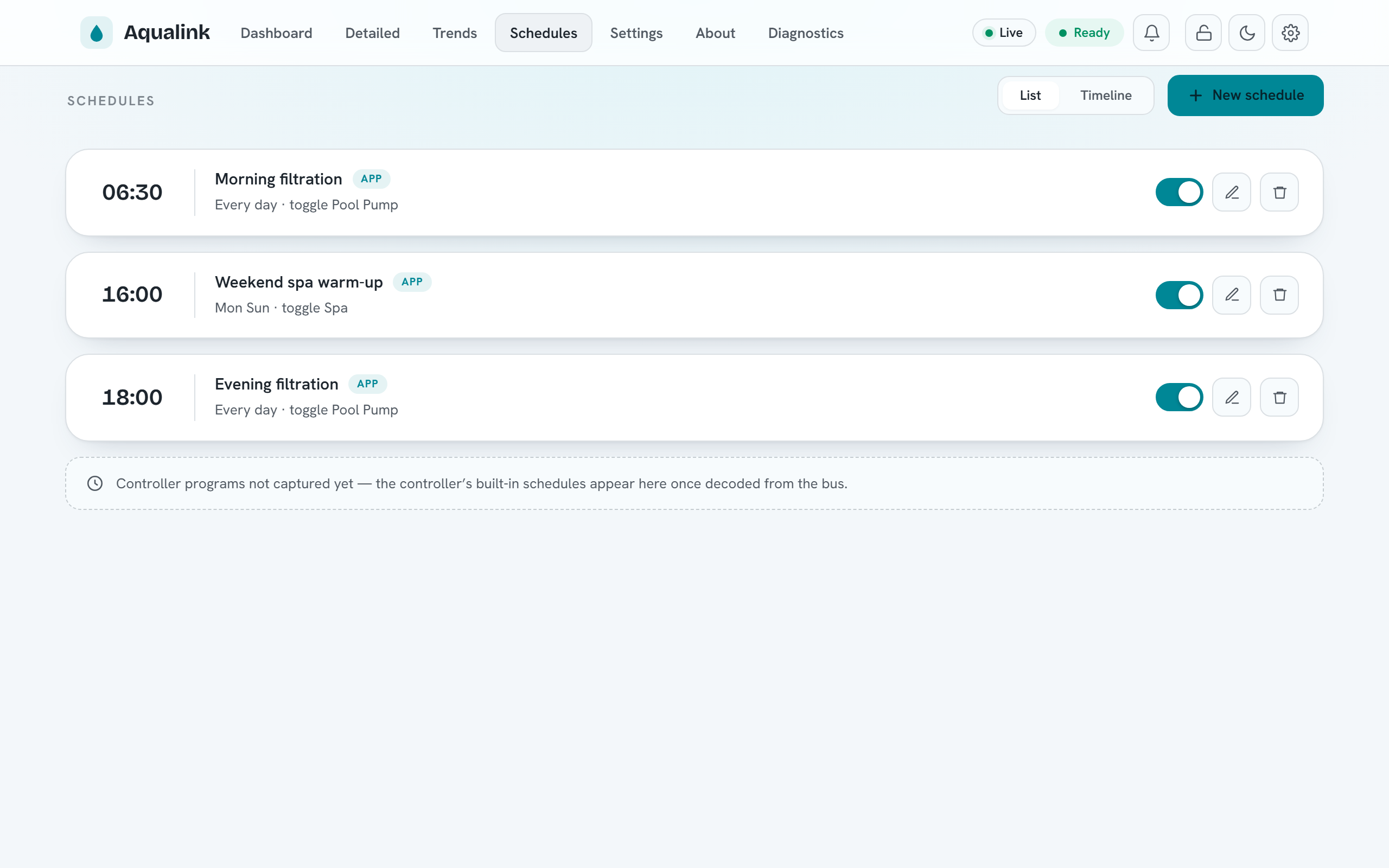
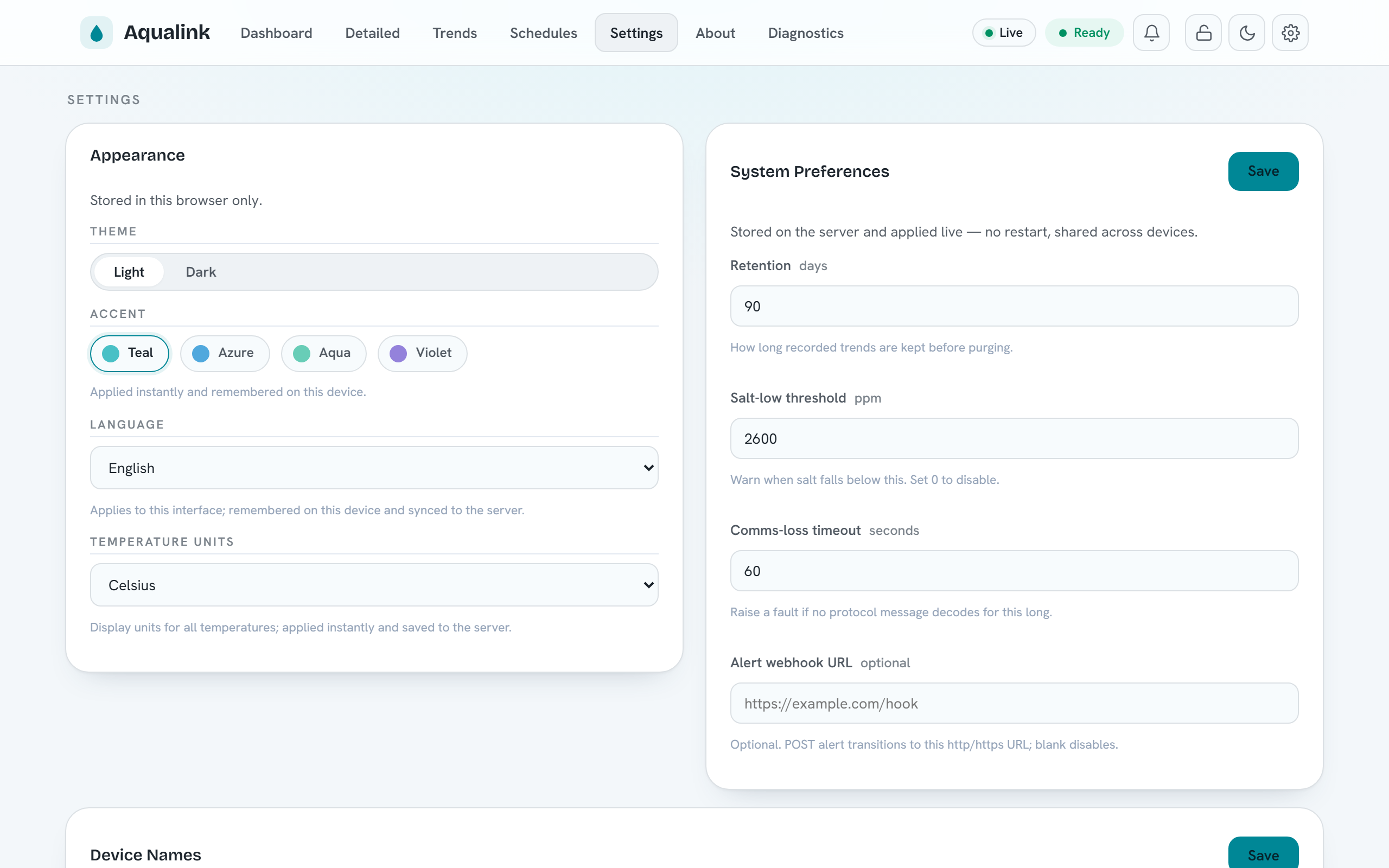
Beyond the main dashboard (pictured in the README), the UI includes a Trends view over the recorded history (--history-db), a Schedules view for the app scheduler (--schedules-file), and a Settings view combining per-browser appearance options with server-side system preferences:
Languages¶
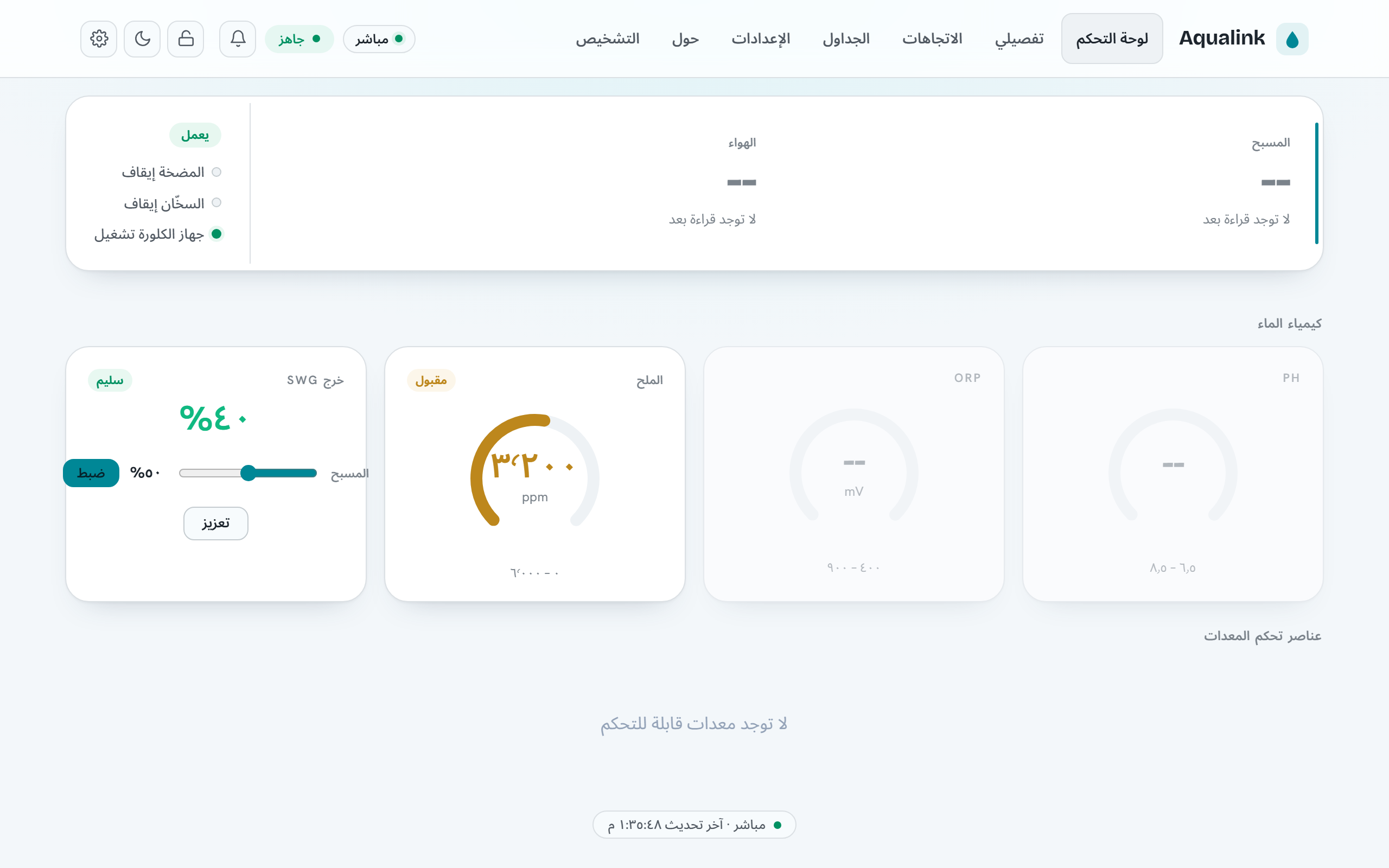
The web UI ships in nine languages — English, German, Spanish, French, Arabic, Hebrew, Japanese, Simplified Chinese, and Yiddish — selected under Settings → Appearance → Language (the available languages are also listed on the About page). By default the UI follows the browser's language; an explicit choice is stored locally for instant boot and mirrored to the server under preferences.ui.locale, so it follows you across devices.
Right-to-left languages (Arabic, Hebrew, Yiddish) mirror the layout automatically, and numbers, dates, and temperatures format per the active locale — Arabic renders Eastern Arabic-Indic digits, and temperatures follow the °C/°F display-units preference everywhere, including the Trends charts.
Translations live in plain-text catalogs and are easy to contribute — see Contributing translations for the workflow and docs/i18n.md for the mechanics.
Responsive layout¶
The UI is a single responsive web app — there is no separate mobile build or native app. The same page reflows across three viewport bands, and the navigation adapts to match:
| Width | Band | Navigation |
|---|---|---|
< 640px |
Phone | A fixed bottom tab bar (Dashboard · Trends · Schedules · More); secondary destinations live behind More, which opens a bottom sheet — a grouped menu with per-row icons, drill-in chevrons, and toggle switches for dark mode and monitor-only mode. |
640–1023px |
Tablet | The inline links collapse behind a hamburger button that opens a nav drawer. |
≥ 1024px |
Desktop | The full inline navigation in the top bar. |
On phones the dashboard reorders and consolidates itself around what you act on most: a condensed Pool/Spa/Air temperature header; equipment as two-up tap-tiles (tap to toggle; a tile fills with the accent colour when its device is on); the heater rows with the temperature-setpoint steppers folded in beneath them; and the water chemistry collapsed into a single card — pH, ORP and salt as an accent-striped row with the salt-water generator output and controls below. The top bar condenses to one row (brand, live/ready status, alerts), with the theme and other toggles moving into the More sheet. Tablet portrait keeps the richer multi-column card grid — circular chemistry dials, a standalone setpoints card — under the hamburger; tablet landscape and desktop use the full inline layout. Modals become full-width bottom sheets on phones and centred dialogs on wider screens. On compact layouts the dense Diagnostics page also collapses to the essentials (System Health, serial-port utilisation, bandwidth, message errors, communication latency); the heavier power-user sections — device list, message statistics, MQTT broker, log levels and serial recording — fold behind a Show advanced diagnostics disclosure, while desktop keeps the full page.
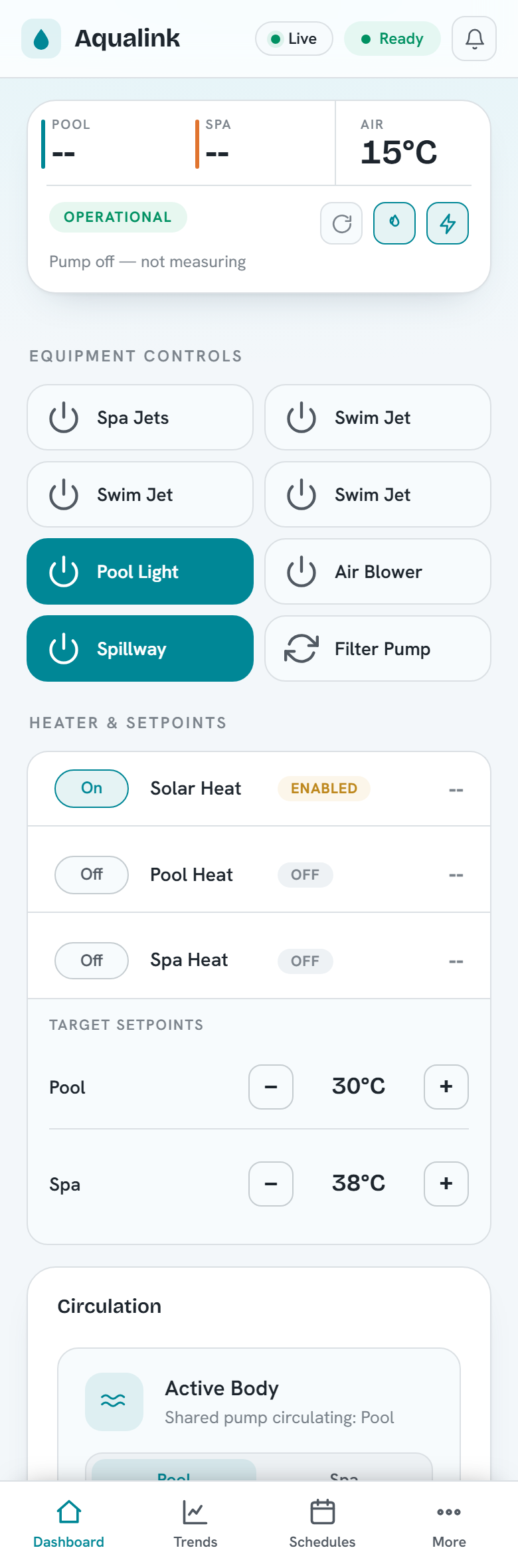
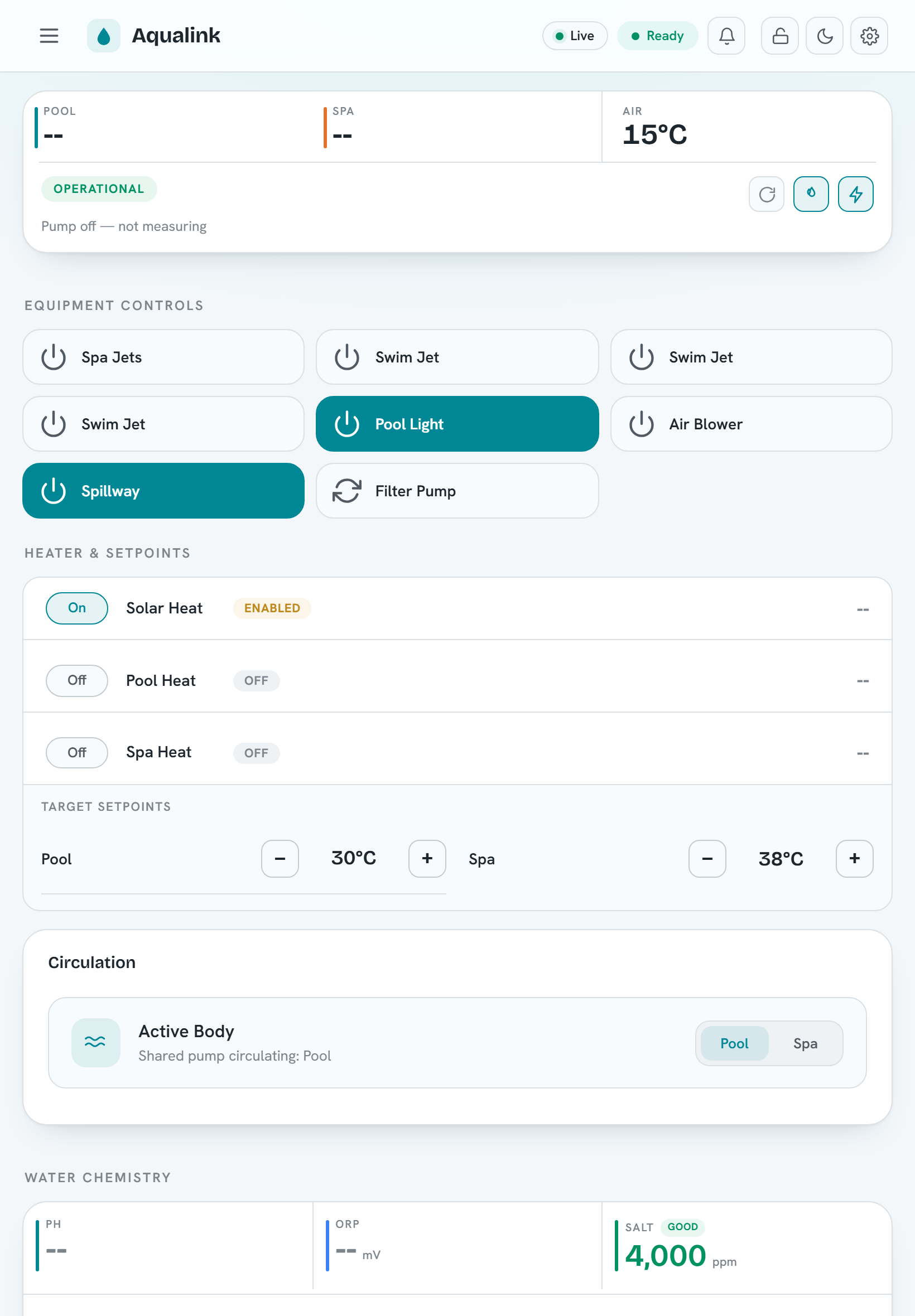
The layout is regression-tested at every band by e2e/responsive.spec.ts, which asserts the correct navigation pattern, no horizontal overflow, RTL mirroring, and dark-mode heading contrast across the phone/tablet/desktop viewports.
Security model¶
Authentication is opt-in and off by default. With no token configured the server behaves exactly as an open, unauthenticated service — every route is reachable without credentials.
To require authentication, set a bearer token via --api-auth-token <token> (config key api-auth-token). When a token is configured:
- Registered routes (everything under
/api, plus/metrics) and any unmatched/api/*path require anAuthorization: Bearer <token>header. The token is compared in constant time. A missing or wrong token returns401 Unauthorized. An unknown/api/*path answers401(not404) so the existence of routes is not leaked. - Static assets are intentionally served without authentication. This is deliberate: the browser must be able to load
index.html, scripts, and CSS to render the login screen before the user has a token. GET /api/healthis intentionally served without authentication. The liveness probe must be reachable by a container/orchestrator health check without baking in the operator's token. It returns only{"status":"ok","uptime_seconds":N}— no sensitive data. The richerGET /api/health/detailedis not exempt: it exposes internal subsystem state and is gated by the bearer-token policy like every other route.- WebSocket upgrades are gated by the same policy. Browsers cannot set an
Authorizationheader on a WebSocket upgrade, so the token rides in theSec-WebSocket-Protocolheader as abearer.<token>entry alongside theaqualinkmarker (for exampleSec-WebSocket-Protocol: aqualink, bearer.<token>). On success the handshake echoes back theaqualinksubprotocol.
Two further hardening layers are built into the routing layer and are exposed via CLI flags / config keys (see the Configuration reference):
- Origin allow-list. Set one or more allowed origins with the repeatable
--api-allowed-originflag (config keyapi-allowed-origin). When at least one origin is configured, a request or WebSocket upgrade whoseOriginheader is not on the list is rejected with403 Forbidden. - CSRF header. Enable
--api-require-csrf-header(config keyapi-require-csrf-header) so that state-changing methods (POST,PUT,DELETE, …) must send anX-Requested-Withheader or they are rejected with403 Forbidden. This check does not apply to the WebSocket upgrade, which is always aGET.
Security: A token over plain HTTP travels in cleartext. Pair --api-auth-token with HTTPS (see the TLS options in the Configuration reference) whenever the server is reachable beyond localhost.
Identity system (--auth-mode)¶
Beyond the shared token, an opt-in identity system is available (design: auth-redesign.md; enforcement model: SECURITY.md). With --auth-mode enabled, every request resolves to a subject, and each route declares the entitlement action it requires — drawn from the v1 vocabulary in auth-redesign.md §4 (equipment.view, the equipment.control.* family, schedules.view/schedules.edit, diagnostics.view, prefs.self, system.admin) — which a default-deny policy engine checks on every request; routes with per-resource grain (e.g. POST /api/equipment/buttons/{button_id}) are checked against the specific resource id in the path, so selector-scoped grants like equipment.control.aux:AUX3 are enforced by the router. A denied request answers 401 when the subject is anonymous and 403 when it is authenticated but not entitled; an unknown /api/* path still answers 401 for an unauthenticated subject (no route enumeration). When --auth-mode enabled, the legacy --api-auth-token shared-token check is superseded — bearer credentials are interpreted by the subject resolver instead. The login and administration flows are fully implemented: username/password sessions with refresh rotation (Sessions), guest browsing and kiosk PIN elevation (Guest mode), and user/group/entitlement/API-key management (Administration). Anonymous callers carry the built-in Guest group's entitlements — empty by default, deny until granted.
HTTP API conventions¶
- Base paths. Application routes live under
/api. Two endpoints are exceptions:GET /metricslives at the root (not under/api), and the web UI / static assets are served from/. - No caching of dynamic responses. Every registered (dynamic) route response is stamped
Cache-Control: no-store. Static assets are not, so they cache normally. - Request body limit. HTTP request bodies are capped at 10000 bytes. A larger body is rejected before your handler runs.
- Connection limits. The server accepts at most 1000 concurrent HTTP connections and applies a 30-second per-operation idle timeout.
- Method dispatch. Each route dispatches on the HTTP method. An unsupported method returns
405 Method Not Allowed. Some routes return a bare405; others (the diagnostics routes) return405with a JSON body such as{"error":"Method not allowed. Use GET."}. - Content types. JSON responses use
application/json. Validation and method errors are usuallytext/plainor a small JSON{"error":"..."}object, depending on the route (noted per route below).
Note: In replay/dev mode the system has no live serial adapter, so command (POST) routes commonly answer 503 while PoolConfiguration is Unknown. This is a documented, accepted outcome — treat it as "not ready", not a server fault.
Route reference by tag¶
All routes below are registered in a single block when the web server is enabled. URLs are compile-time constants.
Health¶
| Method | Path | Success | Notes |
|---|---|---|---|
| GET | /api/health |
200 {"status":"ok","uptime_seconds":N} |
Liveness probe for Docker/Kubernetes health checks. Always unauthenticated (reachable without the bearer token even when --api-auth-token is set); carries no sensitive data. The Docker image ships a HEALTHCHECK that polls it. |
| GET | /api/health/detailed |
200 JSON / 503 when not ready |
Readiness + diagnostics: overall readiness, uptime, version, and per-subsystem checks (configuration + equipment validation, equipment count, MQTT connectivity). Returns 200 once the pool configuration is known, 503 while still starting. Subject to the bearer-token policy (it exposes internal state). Serial/protocol counters are not duplicated here — see /metrics. |
Version¶
| Method | Path | Success | Notes |
|---|---|---|---|
| GET | /api/version |
200 JSON |
App + build metadata and uptime. git_info.uncommitted_changes is the build-time working-tree state and means a tracked source file differed from the commit — it deliberately ignores exec-bit-only changes, untracked build artifacts, and the bootstrapped deps/vcpkg submodule, so a CI-released binary reports false. |
Equipment¶
| Method | Path | Success | Other codes |
|---|---|---|---|
| GET | /api/equipment |
200 JSON |
Full state block (temperatures, chemistry, configuration, devices, stats, version). |
| GET | /api/equipment/devices |
200 JSON |
Devices grouped as auxillaries, heaters, pumps. |
| GET | /api/equipment/version |
200 JSON |
fields[], model_number, fw_revision. |
| POST | /api/equipment/circulation |
200 JSON |
Set circulation mode (pool/spa/spillover). 400 (bad value), 409 (a capable controller is still applying an earlier command -- retry shortly), 503 (no dispatcher / no commandable controller). POST-only; non-POST returns a bare 405. |
| POST | /api/equipment/heater |
200 JSON |
Enable/disable a heater by body of water (pool/spa/solar). 400 (bad value), 409 (controller busy -- retry shortly), 503 (no dispatcher / no commandable controller). POST-only; non-POST returns a bare 405. |
Buttons¶
| Method | Path | Success | Other codes |
|---|---|---|---|
| GET | /api/equipment/buttons |
200 JSON |
List of buttons with controllable flag. |
| POST | /api/equipment/buttons |
200 empty text/html |
Placeholder (no-op). |
| GET | /api/equipment/buttons/{button_id} |
200 JSON |
503 (system not ready), 404 (bad/unknown id). |
| POST | /api/equipment/buttons/{button_id} |
200 JSON (toggled) |
503, 409 (controller busy -- retry shortly), 404, 422, 400 (see below). |
| GET | /api/equipment/aux-slots |
200 JSON |
slots[] — one row per addressable aux id (up to 32, bounded to the detected model once known), merging live device state with the presence/label overrides. Backs the Settings "Device Names" table's "Other aux slots" tab. |
| PUT | /api/equipment/aux-slots/{aux_id} |
200 JSON (updated slot) |
Set/clear an aux's presence override ("auto"|"present"|"absent") — an operator override of live detection, not a relay on/off control. 400 (bad body/value), 404 (unknown aux id), 503 (preferences unavailable). Requires system.admin. Reconciles the live device graph before responding, so REST/WS/MQTT/HA all reflect it immediately. |
Devices¶
| Method | Path | Success | Notes |
|---|---|---|---|
| GET | /api/equipment/iaq |
— | POST only (see Setpoints/commands). |
| POST | /api/equipment/iaq |
200 JSON |
select_button (0..255). 503 no dispatcher / no commandable device, 409 controller busy (retry shortly), 400 bad value. |
| GET | /api/equipment/spaside-remotes |
200 JSON |
remotes, assignments, requested. |
| POST | /api/equipment/spaside-remotes |
200 JSON |
press / assign actions (see below). |
Setpoints¶
| Method | Path | Success | Other codes |
|---|---|---|---|
| GET | /api/equipment/setpoints |
200 JSON |
pool_setpoint, spa_setpoint. |
| POST | /api/equipment/setpoints |
200 JSON |
400 (bad value), 409 (a capable controller is still applying an earlier command -- retry shortly), 503 (no dispatcher / no commandable controller), 500 (dispatch failed for any other reason). |
| POST | /api/equipment/chlorinator |
200 JSON |
400 (bad body), 409 (a capable controller is still applying an earlier chlorinator command -- retry shortly), 503 (no dispatcher / no commandable chlorinator). |
Diagnostics¶
| Method | Path | Success | Notes |
|---|---|---|---|
| GET | /api/diagnostics/emulated-devices |
200 JSON |
Per-device diagnostics array (emulated). |
| GET | /api/diagnostics/actual-devices |
200 JSON |
Per-device diagnostics array (bus-discovered). |
| GET / POST | /api/diagnostics/logging |
200 JSON |
GET returns channels + levels; POST sets a level. |
| GET | /api/diagnostics/options |
200 JSON |
options[] of {name, short_name, description}. |
| GET | /api/diagnostics/mqtt |
200 JSON |
enabled + MQTT connection diagnostics. |
| GET | /api/diagnostics/matter |
200 JSON |
enabled + Matter sidecar status (cached). |
| GET / POST | /api/diagnostics/aux-rediscovery |
200 JSON |
GET returns {in_progress, last_cleared_count}; POST clears every auto-detected auxiliary (sparing any forced Present) and starts a fresh discovery crawl. 409 a crawl is already in progress or the controller isn't active; 503 no OneTouch controller registered. POST requires system.admin. |
| GET / POST | /api/diagnostics/recording |
200 JSON |
GET returns {recording, file, bytes}; POST starts/stops. 400 bad body / rejected filename; 409 already/not recording; 503 no recorder (dev-mode/replay). |
| GET | /api/diagnostics/recording/captures |
200 JSON |
captures[] of {name, bytes, modified} — the finished captures on the server, newest first. |
| GET | /api/diagnostics/recording/captures/{filename} |
200 file |
Downloads one capture (Content-Disposition: attachment). 400 rejected filename; 404 unknown capture; 413 larger than the 64 MiB download limit. |
| GET / POST | /api/diagnostics/profiling |
200 JSON |
GET reports {enabled, running, backend, available}; POST controls it (start/stop/select). 400 (bad body), 409 (no backend in this build), 503 (no controller). |
Non-GET requests to the read-only diagnostics routes return 405 with a JSON body.
Captures. A recording started through POST /api/diagnostics/recording is written into the server's capture directory (--capture-directory, default <cwd>/captures). The client-supplied filename must be a bare *.cap basename and is jailed into that directory; the download route applies the same jail to its {filename}, so neither endpoint can reach a file elsewhere on the host. Only basenames are ever reported — the server-side directory is not disclosed. The listing reports only what the download route would serve (regular files, never symlinks), and modified is seconds since the Unix epoch. All three routes require diagnostics.view for GET (system.admin for the recording POST), like every other diagnostics route. See Serial record / replay.
History¶
| Method | Path | Success | Other codes |
|---|---|---|---|
| GET | /api/history/series |
200 JSON |
503 when history is disabled; 404 unknown key; 400 if to < from. |
Schedules¶
| Method | Path | Success | Other codes |
|---|---|---|---|
| GET | /api/schedules |
200 array |
503 when scheduler disabled. |
| POST | /api/schedules |
201 JSON |
400 invalid body; 503 disabled. |
| GET | /api/schedules/{uuid} |
200 JSON |
404 unknown; 503; 400 missing uuid. |
| PUT | /api/schedules/{uuid} |
200 JSON |
400, 404, 503. |
| DELETE | /api/schedules/{uuid} |
204 |
404, 503. |
| POST | /api/schedules/{uuid}/promote |
200 {status:"queued", schedule} |
404 unknown; 409 a capable writer is busy applying an earlier program change (retry shortly); 422 no on/off complement or non-button action; 400 not representable (blockers[]); 503. |
| GET | /api/controller/schedules |
200 {status, active_group, schedules[]} |
503 when the store is unavailable. |
| POST | /api/controller/schedules |
200 {status:"queued", schedule} |
400 bad body / not representable (with blockers[]); 409 writer busy (retry shortly); 503 no writer. |
| PUT | /api/controller/schedules/{id} |
200 {status:"queued", schedule} |
404 unknown id; 400 bad body / not representable (with blockers[]); 409 writer busy (retry shortly); 503 no writer. |
| DELETE | /api/controller/schedules/{id} |
200 {status:"queued"} |
404 unknown id; 409 writer busy (retry shortly); 503 no writer. |
App-side schedules (/api/schedules) are point actions the app fires; controller
schedules (/api/controller/schedules) are the controller's own built-in
on→off programs, reported as spans. status is available,
pending_capture (parser not yet wired), or unsupported. The controller keeps
two program groups (A/B) with only one active; active_group names it and each
entry carries its group. Only the active group's schedules are observable on
the wire. Writing a controller program (POST create / DELETE) drives a capable
panel's Program menu over RS-485 and is asynchronous — a 200 means the write
was queued, so poll GET to observe the result. Only a controller-representable
span is accepted; an infeasible one is rejected 400 with stable blockers codes
(the same Scheduling::CheckControllerCandidate predicate used for promotion). The
web UI merges both sources into one timeline. See
schedules-design.md for the two-tier model and
iaq_schedule_protocol.md for the wire decode.
Preferences¶
| Method | Path | Success | Other codes |
|---|---|---|---|
| GET | /api/preferences |
200 JSON |
503 when the service is unavailable. |
| PUT | /api/preferences |
200 JSON |
400 (invalid JSON or apply failure), 503. The opaque ui object merges shallowly at its top level (a ui.* value of null deletes that key) so independent UI features never clobber each other's keys. aux_presence_overrides (aux-id -> "present"|"absent") reconciles the live device graph immediately on apply, same as PUT /api/equipment/aux-slots/{aux_id} (the friendlier single-slot entry point). |
Metrics¶
| Method | Path | Success | Notes |
|---|---|---|---|
| GET | /metrics |
200 text/plain |
Prometheus exposition. Lives at the root, not under /api. |
Authentication¶
| Method | Path | Success | Notes |
|---|---|---|---|
| GET | /api/auth/check |
200 {"authenticated":true} |
Only reached when already authorized or auth is disabled; the routing layer answers 401 upstream otherwise. |
| GET | /api/auth/me |
200 JSON |
The resolved subject for the calling request: posture ("disabled"/"enabled"), id, username (human-readable name — the local account's username or an API key's label; empty when the provider has no natural name, fall back to id), authenticated, provider, groups[], entitlements[] — the SPA's single source of truth for gating affordances (enforcement stays server-side). Declares no entitlement requirement, so with --auth-mode enabled an anonymous/guest caller can always probe its own scope. With auth-mode disabled the subject is root-anonymous and entitlements is empty (everything is permitted by posture, so nothing is enumerated). |
Sessions (Slice 2)¶
These routes exist only when --auth-mode enabled. They are the local-account login flow; all four declare no entitlement requirement (they are how a subject acquires or drops a credential), so the router gate is open — enforcement is by the credential in the body.
| Method | Path | Entitlement | Behaviour |
|---|---|---|---|
| POST | /api/auth/login |
open | Verify {username, password}; on success return {access_token, refresh_token, session_id, token_type:"Bearer"}. 401 on bad credentials; 429 (Retry-After: 900) when the account is locked out after repeated failures. Argon2id runs off the kernel thread. |
| POST | /api/auth/refresh |
open | Exchange {refresh_token} for a fresh {access_token, refresh_token} pair (single-use rotation). 401 when invalid/expired, or when a rotated-out token is replayed (the session is then revoked). |
| POST | /api/auth/logout |
open (everywhere needs auth) |
Revoke the session for {refresh_token}; always answers 204 (never discloses whether the token was live). With {"everywhere":true} it revokes every session for the caller and bumps tokver — this variant requires an authenticated subject (401 otherwise). |
| POST | /api/auth/setup |
open | First-run only: create the first administrator from {username, password} when the user store is empty. 201 on success; 403 once setup has already been completed (self-sealing); 400 on a weak password (min 12) or missing fields. |
| POST | /api/auth/pin |
open | Kiosk PIN elevation (guest mode): verify {pin} and, on success, return a {access_token, refresh_token, session_id, token_type:"Bearer"} session in the admin-configured target group. 401 on a wrong/disabled PIN (one indistinguishable error); 429 (Retry-After: 900) when the PIN endpoint is locked out. Argon2id runs off the kernel thread. |
Guest mode¶
/api/auth/me additionally reports kiosk_enabled so the login screen can offer PIN entry. Guest browsing is governed entirely by the built-in Guest group's entitlements (edit it via POST /api/groups): grant it equipment.view to let anonymous visitors reach the dashboard (login-to-elevate stays available); leave it empty for a login wall. Kiosk PIN elevation is configured here:
| Method | Path | Entitlement | Behaviour |
|---|---|---|---|
| GET | /api/kiosk |
system.admin |
Report {enabled, target_group}. The PIN and its hash are write-only and never returned. |
| PUT | /api/kiosk |
system.admin |
Set/replace the PIN from {pin, target_group} (argon2id off-thread). Bumps a kiosk tokver (invalidating prior kiosk sessions) and revokes their refresh tokens. 400 on a short PIN (min 4) or an unknown target group. 204 on success. |
| DELETE | /api/kiosk |
system.admin |
Disable kiosk PIN elevation, clear the PIN, and revoke all live kiosk sessions. 204. |
Kiosk sessions are ordinary JWT sessions (provider = KioskPin) — revocable and listed in /api/sessions under the kiosk subject id — but carry no prefs.self (a shared terminal has no per-user preferences). The subject resolver validates them against the kiosk store's enabled flag + tokver rather than the user store, so disabling the kiosk (or replacing the PIN) drops outstanding kiosk sessions straight back to the Guest scope.
Administration¶
These routes exist only when --auth-mode enabled. Most require the system.admin entitlement; the self-service exceptions (own password, own sessions) are gated on prefs.self — i.e. simply being authenticated — with the admin-vs-self distinction enforced in-handler. A denied request answers 401 when anonymous and 403 when authenticated-but-unentitled.
| Method | Path | Entitlement | Behaviour |
|---|---|---|---|
| GET | /api/users |
system.admin |
List local accounts (id, username, groups, direct entitlements, disabled, tokver; never the password hash). |
| POST | /api/users |
system.admin |
Create an account from {username, password, groups?, direct_entitlements?}. 400 weak password / unknown entitlements; 409 duplicate username. |
| GET | /api/users/{user_id} |
system.admin |
Fetch one account record. 404 unknown. |
| PUT | /api/users/{user_id} |
system.admin |
Partial update of username/groups/direct_entitlements/disabled. A grant change bumps tokver; disabled:true also revokes every session. 409 on duplicate username or last-admin protection. |
| DELETE | /api/users/{user_id} |
system.admin |
Delete the account, revoke its sessions, forget its per-user prefs (audit retained). 409 for the last enabled admin. |
| PUT | /api/users/{user_id}/password |
prefs.self |
Set a password. An admin may set anyone's; any other subject only their own (403 otherwise). On success bumps tokver and revokes every session. 400 if under 12 chars. |
| GET | /api/groups |
system.admin |
List groups (name, entitlements, built_in). |
| POST | /api/groups |
system.admin |
Upsert a group by name from {name, entitlements}. A change bumps every member's tokver. 400 on unknown/malformed entitlements. |
| DELETE | /api/groups/{group_name} |
system.admin |
Delete a non-built-in group (members' tokver bumped). 404 unknown; 409 built-in. |
| GET | /api/entitlements |
system.admin |
List the known entitlement-action vocabulary ({"actions":[...]}) so the UI can enumerate what is assignable. |
| GET | /api/apikeys |
system.admin |
List API-key metadata (id, label, entitlements, expiry, last-used, revoked); never the secret. |
| POST | /api/apikeys |
system.admin |
Create an entitlement-scoped key from {label, entitlements, expiry_unix?}. The 201 body carries the shown-once secret (aak_...) plus a warning. 400 missing label / bad entitlements. |
| DELETE | /api/apikeys/{key_id} |
system.admin |
Revoke a key (stays listed as revoked). 404 unknown. |
| GET | /api/sessions |
prefs.self |
List active refresh-token sessions. An admin sees every session; any other subject only their own. |
| DELETE | /api/sessions/{session_id} |
prefs.self |
Revoke one session ("log out that browser"). An admin may revoke any; any other subject only their own — a non-owned id answers 404 (indistinguishable from unknown, so ids are not enumerable). |
Preferences are per-user. When the identity system is on and the caller is authenticated, GET/PUT /api/preferences becomes subject-aware. The per-user fields — temperature_units, theme, accent, and chemistry_bands — are stored per account and synced server-side; a GET returns the live global defaults with the caller's overrides layered on top. Every other field is a system/admin preference (alert thresholds, history retention, label overrides, spa-switch mapping, …) and a PUT touching one requires system.admin (403 otherwise). An anonymous caller (or auth-mode disabled) reaches none of the per-user machinery — the whole document is global, and the SPA keeps an anonymous visitor's units/theme/accent choices in localStorage.
Key request and response examples¶
GET /api/equipment¶
Returns the full equipment state. The top-level keys are temperatures, chemistry, configuration, devices, stats, and version. The shape below shows the documented fields.
{
  "temperatures": {
    "pool": { "celsius": 28, "fahrenheit": 82, "last_updated": 1782600000, "stale": false },
    "spa": null,
    "air": { "celsius": 24, "fahrenheit": 75, "last_updated": 1782600000, "stale": false },
    "pool_setpoint": { "celsius": 28, "fahrenheit": 82 },
    "spa_setpoint": { "celsius": 38, "fahrenheit": 100 },
    "staleness_threshold_seconds": 600
  },
  "chemistry": {
    "salt_ppm": 3200,
    "orp_mv": null,
    "ph": null,
    "chlorinator": {
      "generating_percent": 50,
      "generating_reason": "Generating",
      "duty_cycle": 50,
      "pool_setpoint_percent": 45,
      "spa_setpoint_percent": 50,
      "setpoint_percent": 45,
      "status": "Generating",
      "health": "Ok",
      "health_flags": ["Ok"]
    }
  },
  "configuration": {
    "pool_configuration": "PoolOnly",
    "configuration_source": "DataHub",
    "expected_auxillary_count": 6,
    "expected_power_center_count": 1,
    "validation": {
      "passed": true,
      "expected_auxillaries": 6,
      "discovered_auxillaries": 6,
      "expected_power_centers": 1,
      "discovered_power_centers": 1,
      "anomalies": []
    },
    "bodies": [
      { "id": "Pool", "label": "Pool", "is_active": true,
        "temperature": { "celsius": 28, "fahrenheit": 82 },
        "setpoint": { "celsius": 28, "fahrenheit": 82 } }
    ]
  },
  "devices": { },
  "stats": { },
  "version": { }
}
Field notes (these are deliberate, not bugs):
salt_ppmis a rawuint16. A value of0is emitted as-is, not nulled.orp_mvisnullwhen the reported value is exactly0(no sensor on the wire).phisnullwhen the reported value is exactly0.0.chlorinatorisnullwhen no chlorinator (SWG) has been discovered; otherwise it carriesgenerating_percent,generating_reason,duty_cycle, the configured setpoints,status,health, andhealth_flags.generating_percentis the instantaneous output and is0whenever the cell is idle — which alone cannot distinguish a chlorinator that is switched off from one that is configured and healthy but has no flow.generating_reasonsays which it is:Generating,Off(setpoint is 0%),PumpOff(configured, but no filter pump is running),NoFlow(a pump is running but the cell reports no flow),Fault(the cell is in a warning/error state),Idle(configured and not generating, no nameable reason), orUnknown(nothing reported yet). It is derived server-side so the web UI, MQTT and Home Assistant agree.- The cell's wire status byte is a true bitfield, so more than one health condition can be active at once (e.g. a low-salt warning together with a high-current warning).
healthis the single worst-of-the-set flag (electrical/hardware flags outrank chemistry flags, which outrank routine-maintenance flags) — kept for backward compatibility with consumers that only expect one value.health_flagsis the full array of every currently-active flag; it always contains at leasthealthitself. setpoint_percentis the configured target for the currently active body (resolving topool_setpoint_percentorspa_setpoint_percent, falling back to the last-known generating %); it is what the dashboard's Target slider seeds from.validationis an object once the startup scrape completes, ornullbefore then. The spellingexpected_auxillary_count(and the nestedexpected_auxillaries/discovered_auxillaries) is the exact field name in the payload.- A temperature is either a
{ "celsius": ..., "fahrenheit": ... }object ornull.
GET /api/equipment/buttons¶
{
  "buttons": [
    {
      "id": "1f3c...uuid",
      "label": "Filter Pump",
      "display_label": "Filter Pump",
      "status": "On",
      "device_type": "FilterPump",
      "controllable": true
    }
  ]
}
controllable is false for Chlorinator and Unknown device types (they are configurable/informational, not on/off toggles), and for Light.
A light is reported read-only even though it is an on/off device. A Light here is a separate RS-485 colour-light controller (bus ids 0xF0–0xF4), not the aux relay that switches it — that relay appears in this same list as a controllable Auxillary, and is what you toggle. A light device carries no hardware aux id and only a synthetic label, so no controller can map an actuation to it and POST /api/equipment/buttons/{id} would always return 422. Its value is the state and colour/mode it reports, which the relay cannot.
status is present whenever the device type has a status the panel reports, and omitted otherwise. Auxillary, Cleaner, Light, Spillover and Sprinkler all report the auxiliary vocabulary (On, Off, Enabled, Pending, Unknown); Pump reports Off/Running/NotInstalled/Unknown, Heater reports Off/Heating/Enabled/NotInstalled/Unknown, and Chlorinator reports On/Off/Unknown. Only Unknown-type devices carry no status member at all. A light whose watchdog has expired reports Unknown rather than staying stuck on its last known state.
POST /api/equipment/buttons/{button_id} (toggle)¶
Toggle a single controllable device by its UUID.
Status mapping (from the command dispatcher result):
| Outcome | Status |
|---|---|
| Toggled successfully | 200 (body above) |
| No serial adapter / not ready / null dispatcher | 503 (with Retry-After) |
| A capable controller is still applying an earlier command (retry shortly) | 409 (with Retry-After) |
| Device id not found | 404 |
| Device type cannot be mapped to a command | 422 |
| Invalid value for the command | 400 |
PoolConfiguration == Unknown (system still starting) yields 503 for both GET and POST. A missing, unparseable, or unknown button_id yields 404.
POST /api/equipment/setpoints¶
Set pool and/or spa water-temperature setpoints. Values are in Celsius. Each field is validated to be finite and within -10.0 .. 50.0; an out-of-range value returns 400 (text/plain). Either field may be omitted.
curl -X POST http://127.0.0.1:8080/api/equipment/setpoints \
  -H 'Content-Type: application/json' \
  -d '{ "pool": 28.0, "spa": 38.0 }'
{
  "pool": { "status": "success", "celsius": 28.0 },
  "spa":  { "status": "success", "celsius": 38.0 }
}
With no command dispatcher available the whole request returns 503 (text/plain "Command dispatcher not available"). If any accepted field's dispatch fails, the overall status follows the WORST per-field result -- 409 when a capable controller is still applying an earlier setpoint command (the body additionally carries a top-level error/code: "setpoint_busy"), 503 when no commandable controller exists, 500 otherwise -- while the per-field JSON still reports each field's individual status.
POST /api/equipment/chlorinator¶
Set the chlorinator generating percentage and/or its boost mode.
The panel keeps an independent output setpoint per body of water — you can run the spa at 70% while the pool sits at 40% — so body selects which one percentage applies to. It is optional and defaults to Pool, which is what the single-value form has always driven, so existing callers are unaffected. Only Pool and Spa are accepted (case-insensitive); anything else is a 400, because the panel has no row to write.
curl -X POST http://127.0.0.1:8080/api/equipment/chlorinator \
  -H 'Content-Type: application/json' \
  -d '{ "percentage": 60, "boost": false }'
percentageis a number in0 .. 100.bodyisPool(default) orSpa, and selects which setpointpercentagewrites.boostis a boolean.
{
  "percentage": { "status": "success", "value": 60 },
  "boost":      { "status": "success", "value": false }
}
Note: There are two distinct 503 shapes here. A missing dispatcher returns text/plain "Command dispatcher not available". A command that ran but failed returns the per-field JSON body with the mapped status code. A 409 means a capable controller exists but is still applying an earlier chlorinator command (e.g. an overlapping "Set" click landed mid-actuation) -- the body additionally carries a top-level error/code: "chlorinator_busy" and the client should retry shortly rather than treat it as a hard failure.
POST /api/equipment/circulation¶
Set the circulation mode (which body of water the system circulates).
curl -X POST http://127.0.0.1:8080/api/equipment/circulation \
  -H 'Content-Type: application/json' \
  -d '{ "mode": "spa" }'
mode is a string and must be one of pool, spa, or spillover.
POST-only: any non-POST method returns a bare 405. A missing/non-string mode, or a value outside the allowed set, returns 400 (text/plain). With no command dispatcher available the request returns 503 (text/plain "Command dispatcher not available"). The HTTP status otherwise follows the command-dispatch result (400 invalid value, 409 a capable controller is still applying an earlier command -- retry shortly, 503 no serial adapter / device not found, 422 unknown equipment type, 500 otherwise).
POST /api/equipment/heater¶
Enable or disable a heater, identified by its body of water. solar is modelled as the shared heater.
curl -X POST http://127.0.0.1:8080/api/equipment/heater \
  -H 'Content-Type: application/json' \
  -d '{ "body": "spa", "enable": true }'
bodyis a string and must be one ofpool,spa, orsolar.enableis a boolean.
POST-only: any non-POST method returns a bare 405. A missing/non-string body (or a value outside the allowed set) or a missing/non-boolean enable returns 400 (text/plain). With no command dispatcher available the request returns 503 (text/plain "Command dispatcher not available"). The HTTP status otherwise follows the command-dispatch result (as for circulation, above), including 409 when a capable controller is still applying an earlier command.
POST /api/equipment/iaq¶
curl -X POST http://127.0.0.1:8080/api/equipment/iaq \
  -H 'Content-Type: application/json' \
  -d '{ "select_button": 3 }'
select_button is an integer in 0 .. 255. Response: 200 {"select_button":{"status":"success","value":3}}. A missing dispatcher (or no commandable device) returns 503; a capable controller still applying an earlier command returns 409 (retry shortly); a bad value returns 400.
POST /api/equipment/spaside-remotes¶
Two actions are supported. press actuates an emulated remote:
curl -X POST http://127.0.0.1:8080/api/equipment/spaside-remotes \
  -H 'Content-Type: application/json' \
  -d '{ "action": "press", "address": 32, "button": 1 }'
| Outcome | Status |
|---|---|
| Press queued | 200 |
| No remote at that address | 404 |
| Remote is real (observe-only, not emulated) | 409 |
| Button out of range | 400 |
assign programs a switch button to a function:
curl -X POST http://127.0.0.1:8080/api/equipment/spaside-remotes \
  -H 'Content-Type: application/json' \
  -d '{ "action": "assign", "switch": 1, "button": 2, "function": "Spa" }'
| Outcome | Status |
|---|---|
| Accepted | 200 |
| Invalid switch/button/function | 400 |
| Controller busy | 409 |
| No controller can program assignments | 503 |
Note: Two distinct 503 bodies exist. A null controller (dev/replay mode) returns {"error":"Spa-side remote control is not available in this mode"}. An assign with no capable controller returns {"error":"No controller can program spa-switch assignments on this system"}. A missing or unknown action returns 400.
GET /api/history/series¶
List all series, or query one. Returns 503 when history is disabled (no history database configured).
[
  { "key": "temp/pool", "unit": "C", "label": "", "first_ts": 1700000000, "last_ts": 1700090000, "count": 900 },
  { "key": "device/4b8c1e2a-7f3d-4a9b-bc10-2f5e6d7a8b90", "unit": "state", "label": "Pool Light", "first_ts": 1700000000, "last_ts": 1700090000, "count": 18 }
]
label is the friendly display name. Device series are keyed by the stable
button UUID (device/<uuid>) so a device that is renamed after discovery (e.g.
Aux5 → Pool Light) stays a single series; analog series use an empty label.
# Query a single series within a time window
curl 'http://127.0.0.1:8080/api/history/series?key=pool_temp&from=1700000000&to=1700090000&max_points=500'
{ "key": "pool_temp", "from": 1700000000, "to": 1700090000, "max_points": 500,
  "points": [ { "ts": 1700000000, "value": 28.1 } ] }
Query parameters: key selects a series; an unknown key returns 404. from defaults to 0, to defaults to "now", and to < from returns 400. max_points defaults to 500, clamped to 1 .. 2000.
WebSocket protocol¶
There are two WebSocket endpoints:
| Endpoint | Purpose |
|---|---|
/ws/equipment |
Live equipment, chemistry, temperature, status, and alert updates. |
/ws/equipment/stats |
Live statistics updates. |
Neither handler processes inbound client messages — the channels are server-to-client only.
Frame envelope¶
Every frame is a JSON object with two fields:
type is the name of a WebSocket_EventTypes value: ChemistryUpdate, StatisticsUpdate, TemperatureUpdate, CirculationUpdate, SystemStatusChange, SystemStateUpdate, ButtonStateChange, AlertTransition, or Unknown.
What each endpoint sends¶
/ws/equipment broadcasts:
ChemistryUpdate— pH / ORP / salt, and the whole chlorinator object whenever its setpoints, output or health changeTemperatureUpdateCirculationUpdate— circulation/heater mode changesButtonStateChangeSystemStatusChangeAlertTransition—{ "condition": ..., "state": "raised" | "cleared", "ts": ..., "detail": ..., "params": <object, optional> }—detailis the English description;paramscarries the structured values behind it (e.g.{"salt_ppm": 2400, "threshold_ppm": 2700}) for translated UI text / automations (docs/i18n.md). Conditions:chlorinator_fault,chlorinator_warning,salt_low,service_mode,serial_comms_loss, andtemperature_stale(pump running but the active body's water temperature has outlived--temperature-staleness-threshold; pump-off staleness is expected and never raises — the UI just ages the reading)
On connect, /ws/equipment enqueues exactly one SystemStateUpdate so a freshly connected client knows the current state immediately:
{
  "type": "SystemStateUpdate",
  "payload": {
    "state": "ready",
    "pool_configuration": "PoolOnly",
    "equipment_mode": "Normal"
  }
}
state is one of ready, starting, or service_mode.
/ws/equipment/stats sends StatisticsUpdate frames.
Per-type payload fields¶
These are the fields the UI consumes from each frame's payload:
| Event type | Payload fields |
|---|---|
TemperatureUpdate |
pool_temp, spa_temp, air_temp, pool_setpoint, spa_setpoint — each a raw dual-unit object {celsius, fahrenheit} (same shape as REST /api/equipment; display formatting is the frontend's job, see docs/i18n.md) |
ChemistryUpdate |
ph, orp, salt_level; and chlorinator — the same object as chemistry.chlorinator in REST /api/equipment (generating_percent, duty_cycle, status, health, health_flags, pool_setpoint_percent, spa_setpoint_percent, setpoint_percent, generating_reason). It is present only on an event that reports a chlorinator change (the state is checked once a second and again immediately after a successful POST /api/equipment/chlorinator), and may be null, meaning the chlorinator is no longer present. A client must key on the field's presence, not its truthiness |
ButtonStateChange |
button_id, status, label (optional) |
SystemStateUpdate |
state, pool_configuration, equipment_mode |
SystemStatusChange |
status_type, source_name, source_type |
Connection limits¶
- Each connection has an outbound queue capped at 100 messages. When full, the oldest message is dropped (with a rate-limited warning) before the new one is enqueued.
- Inbound WebSocket frames are capped at 64 KiB.
- The same HTTP limits apply to the upgrade request: a 10000-byte body limit, at most 1000 concurrent connections, and a 30-second idle timeout.
Keepalive and reverse proxies¶
Both endpoints send a WebSocket protocol-level ping after roughly 30 seconds of silence (the server runs a 60-second idle timeout with keep-alive pings enabled — see WebSocketServerTimeout() in src/core/http/server/websocket_timeouts.h). This matters because /ws/equipment is change-driven: with the pool in a steady state no data frames flow for minutes, and without the pings a reverse proxy in front of the app would sever the quiet connection at its own idle timeout (nginx defaults proxy_read_timeout to 60 s; Cloudflare closes idle WebSockets after ~100 s), causing a spurious "Connection lost — retrying..." toast in the UI. Browsers answer pings automatically — clients do not need to implement anything.
If you run a reverse proxy in front of the application, any WebSocket/upstream idle timeout of 60 seconds or more works out of the box. A proxy configured tighter than ~30 seconds will still drop quiet connections. A peer that stops answering pings is torn down by the server within the 60-second idle timeout.
Prometheus metrics¶
GET /metrics returns Prometheus exposition text with content type text/plain; version=0.0.4; charset=utf-8. It is at the root, not under /api. A token-protected deployment requires the bearer token for /metrics too.
Series emitted:
| Metric | Type | Labels |
|---|---|---|
aqualink_build_info |
gauge (always 1) |
version, commit |
aqualink_serial_read_bytes_total |
counter | — |
aqualink_serial_write_bytes_total |
counter | — |
aqualink_messages_total |
counter | — |
aqualink_message_errors_total |
counter | kind (checksum, deserialization, invalid_packet_format, generator, overlapping_packets, buffer_overflow) |
aqualink_serial_errors_total |
counter | kind (overflow, underflow, transmission_failure) |
aqualink_latency_microseconds |
gauge | stage (serial_read, serial_write, msg_proc), quantile (0.01, 0.5, 0.95, 0.99) |
A minimal scrape config:
scrape_configs:
  - job_name: aqualink-automate
    static_configs:
      - targets: ['127.0.0.1:8080']
    # If a bearer token is configured:
    # authorization:
    #   credentials: '<token>'
Viewing the API spec¶
The machine-readable OpenAPI spec is swagger.yaml. It is served as a static asset, not by a dedicated route handler, reachable at:
Because it is a static asset, it is served as raw YAML and (like all static assets) without authentication.
To browse it as interactive Swagger UI, use the Docker docs profile:
See INSTALL.md for the Swagger UI docs profile and other deployment details.
Related documentation¶
- Configuration reference —
--api-auth-token,--address,--http-port, and the TLS flags that control this server. - MQTT and Home Assistant — the MQTT control surface, an alternative to this HTTP API.
- swagger.yaml — the machine-readable companion to this reference.
- INSTALL.md — installation and the Swagger UI docs profile.